
Kata-fying the SDLC for my army of agents A deeper dive into my sandboxed, multi-model orchestra
Intro
A few weeks ago I wrote up my spec-driven setup: living specs with orchestrator I call Ballador. My team suggested a follow-up post that talks about the tweaks and configs that might be looking to dive deeper.
Ballador cuts a big spec into mini-specs, and creates tasks for groundcrew's sandboxed agents that run in parallel worktrees until PRs show up in Github and tickets move in Linear.
If you do npm install -g @clipboard-health/groundcrew@latest and ask an agent to wire up a config, you already get something that works pretty well. Out of the box crew gives you a parallel-agent runner and helps you set up a sandbox.
I've added a few things on top to match my needs: multi-harness, multi-model, usage analytics, credential-sensitive, and reviews to a point where this is safe enough to leave the agents alone building while I'm brewing coffee.
This post tries to answer two questions: what are my config tweaks, and what do you get that makes them worth it?
The SDLC Kata
Building with agents should feel like building with your team. What I'm doing here is kata-fying my own Software Development Lifecycle (SDLC).
I wrote about katas before, but let me refine the definition rather than repeat it:
A kata is a rehearsed choreography, a fixed set of movements you repeat until they run without conscious thought. You practice it slowly at first, until the sequence becomes second nature, and you can perform it under pressure without analyzing or thinking about each step.
At a task orchestration level, the Software Development Life-Cycle (SDLC) can become a kata with four movements:
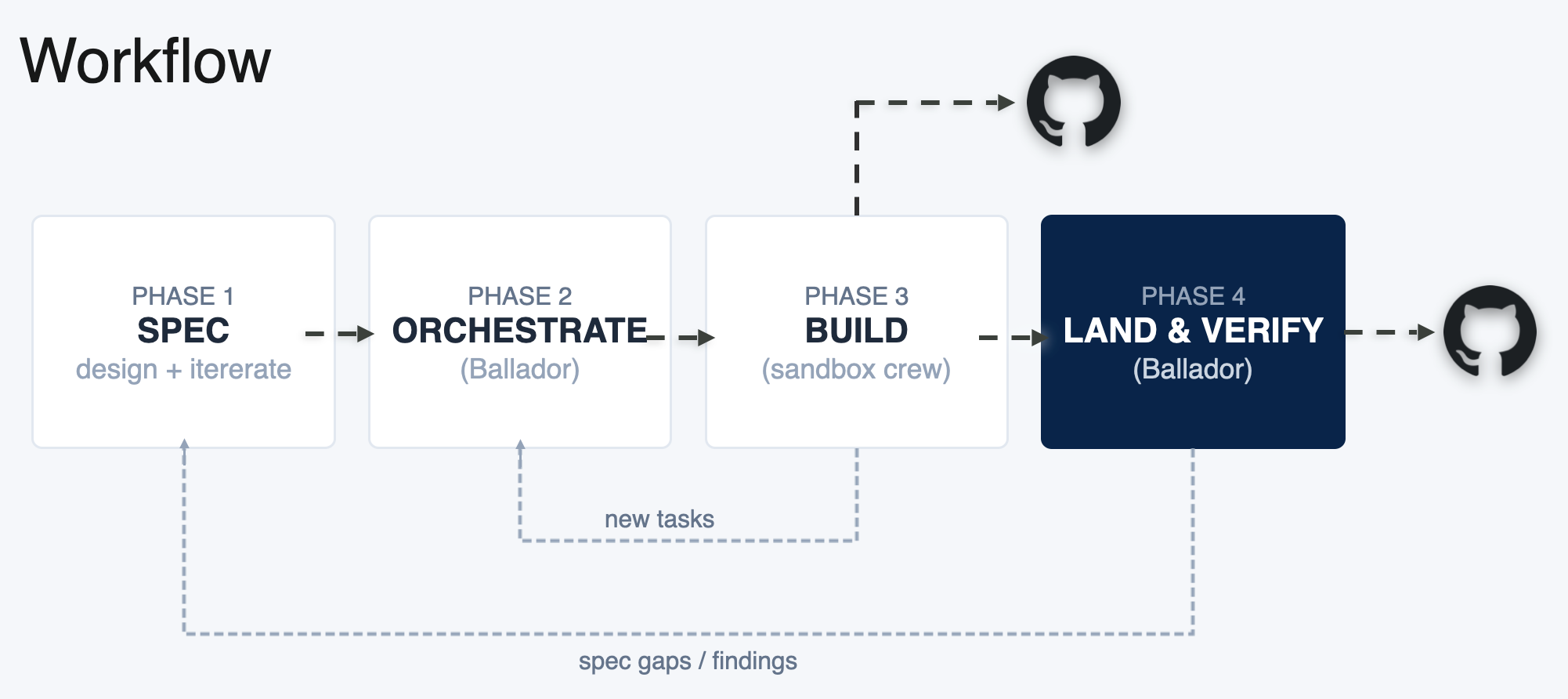 Software Development Life-Cycle as “a kata”
I refine the spec with Ballador and the System Design skill (Phase 1), then Ballador cuts it into parts and dispatches them (Phase 2), and crew runs the build in parallel, with different agents doing different things (Phase 3).
Phase 3 has its own arrow straight to GitHub. For simple, one-shot tasks the agent opens its own PR and we're done. Anything with more scope takes the longer path: a different set of agents reviews the work, the building agents address any findings, and Ballador integrates and opens the PR itself (Phase 4). As the engineer in charge, you'll work in both modes, depending on the scope of the project and how ambitious the spec is.
Software Engineering is an infinite game. Building surfaces new tasks, which go back into the orchestration phase; shipping surfaces spec gaps and learnings, which feed the way back into the spec.
Ballador absorbs some of the cognitive load of the SDLC for you: keeping specs up to date with code and architectural changes, adding new tasks and closing tasks that are no longer needed as agents build, and verifying the agents' work before you (or the rest of your team) look at it.
That resembles how I already work with engineers, and it works for agents too.
The Build Setup
Hooks in Groundcrew
Like I mentioned before, I run agents inside Safehouse (Mac only). Safehouse is deny-first: it masks the host $HOME and blocks outbound traffic and file system access.
Groundcrew provides two hooks for the agent's lifecycle:
preLaunch: runs before the sandbox on the host machine (your laptop) with full filesystem and credential access.prepareWorktree: runs inside the sandbox, after the worktree is checked out, with the sandbox already locked.
tl;dr: Do the privileged setup on the host, then bootstrap the worktree.
Some examples of how I use these hooks:
preLaunch | prepareWorktree |
|---|---|
| Add API keys to the environment | Install dependencies (cache redirected into the worktree) |
Copy untracked .agents/ into the worktree | pnpm install |
Patch trustedWorkspaces for Antigravity | uv sync --dev --frozen |
| Serve short-lived AWS creds | Redirect CDK_HOME → {{worktree}}/.cdk |
Most of my changes use one of these two hooks. The Clipboard Health team provides two guides for this. One for agents (mostly about setting up the project for worktrees) and this one that's more general.
Multi-agents
I work with different coding agents for different "classes" of tasks. In personal projects I use Claude Code and Antigravity.
We have an opinionated engineering team at Standard Metrics, and we encourage everyone to find what works best for them. Some engineers prefer Sourcegraph's Amp, some use Codex and some favor Cursor.
crew runs Claude Code and Codex by default. I had to configure Google Antigravity (agy, Gemini under the hood) and Sourcegraph Amp (amp).
Each one broke on its own peculiar way:
| Challenge | Antigravity (agy) | Amp (amp) |
|---|---|---|
| Non-interactive Prompt | Wants --prompt-interactive placed last; crew appends the prompt to the command array | Reads stdin. Needs a thin wrapper exec amp <<< "$1" |
| Workspace trust | Prompts for trust on new directories, which blocks headless runs | n/a |
| Autonomy | --dangerously-skip-permissions to auto-approve tool calls | amp.dangerouslyAllowAll = true in a granted config |
| Config / State | Stores state under ~/.gemini; the home-mask hides it, so I grant it back via sandboxWritePaths | Loads keys from the host keychain, forwarded as AMP_API_KEY / AMP_SETTINGS_FILE |
Non-interactive prompts: This is how you inject their part of the spec and any special instructions into the agent. Each CLI does it in a different way. Amp needed a thin wrapper script that pipes the prompt to stdin.
Workspace trust: Antigravity refuses to run headless in a directory it hasn't seen before. It wants a human to click "trust this folder", but every task gets a brand-new worktree, so every task is a new folder. The fix is a preLaunch hook that parses agy's settings on the host, prunes dead paths, and appends the fresh {{worktree}} to trustedWorkspaces.
Autonomy: You need to pass specific flags depending on the harness to let agents run without babysitting like --dangerously-skip-permissions vs --dangerously-allow-all.
There are a handful of configs needed for the agents to work correctly. For example, antigravity needs access to ~/.gemini or Amp uses the browser to complete its authentication flow so I use two environment variables and the keychain to share the auth with instances of amp.
You can see the documentation for configuring agents here.
Sharing uncommitted files
Sometimes you want to share uncommitted files with the agents. In my case it was two review skills I was testing. A git worktree only materializes tracked files, and my skills were untracked in .agents/ because they're local, not yet on the repo.
preLaunch runs on the host with access to the real checkout, so it can copy them across before the sandbox launches:
// something like this in crew.config.ts
export default {
    preLaunch: async ({worktree, repoRoot}) => {
        await cp(`${repoRoot}/.agents`, `${worktree}/.agents`, {recursive: true});
    },
};
The same trick works for anything else that lives outside version control: a .env.local you don't want to commit, a scratch scripts/ directory, personal MCP configs, etc.
GitHub Access
Safehouse blocks direct SSH access, and I have the habit of using it for git access ([email protected]:... origins).
The first time Amp finished working and tried to push its branch, it couldn't. In the first post I told the story of an agent (Claude Code) noticing it was locked in the sandbox and thrashing through method after method until it got through.
Amp and Antigravity failed and didn't attempt further, so I had to give them tokens to use.
I set up a token and forward it with preLaunchEnv: ["GH_TOKEN"]. I followed mise's approach for handling github tokens. I went from the GitHub CLI auth to 8h tokens with ghtkn. After a while the analytics (more on that below) showed me that the build tasks never take more than 1h. I've been testing a script that invalidates the token via the GH API, but it means a new browser window every hour, which is annoying.
If you don't feel like wiring that up, just make sure the project's origins use https and use gh CLI auth or have the orchestrator agent handle commits in Phase 4.
AWS Access
I've watched agents probe AWS profiles in ~/.aws/ and the environment to escalate access or generate bearer tokens for CLIs that were authenticated when they tried to solve a task unattended. That was the original forcing function for using sandboxes.
Most tasks don't touch AWS. But sometimes I do want them to deploy changes to test and validate features.
In my setup no AWS credentials live in the sandbox. Ever. There's a specific agent profile, claude-aws, that Ballador assigns only to tasks that need it. For those, preLaunch adds an environment variable AWS_EC2_METADATA_SERVICE_ENDPOINT that points at a little server running on the host. It pretends to be the EC2 instance-metadata service with short-lived STS credentials to the environment:
// this would be part of crew.config.ts
export default {
    // ...
    agents: {
        claude_aws: {
            cmd: "claude --permission-mode auto",
            color: "#FF9900",
            preLaunch: [
                "export AWS_EC2_METADATA_SERVICE_ENDPOINT=http://127.0.0.1:1338/",
                "export AWS_REGION=us-east-1",
                'export CDK_HOME="{{worktree}}/.cdk"',
                'mkdir -p "$CDK_HOME"',
            ].join(" && "),
            preLaunchEnv: [
                "AWS_EC2_METADATA_SERVICE_ENDPOINT",
                "AWS_REGION",
                "CDK_HOME"
            ],
        }
    }
}
The script uses Amazon's EC2 Metadata mock server, and forces it to expose an agent-tokens profile that doesn't exist anywhere else. The agent's AWS SDK thinks it's on an EC2 box with an instance role. No way to escalate. It can't read ~/.aws/ and it doesn't know any of the real profiles.
Oops! The agent can't tell me it's done
This one made me laugh a little. One of the agents finishes, runs crew task done <id> to report back, and it fails with Operation not permitted.
The sandbox blocks access to any path that isn't in the config. Since I'm using DuckDB as my task database, the agents needed a way to write to that folder.
The prompt overrides the default completion instructions and tells the agent to call a sandbox-reachable script instead of crew task done:
sh ~/dev/groundcrew/db/complete.sh {{task}} \
  --outcome success --model <model-id> [--pr <url>] [--notes "<summary>"]
complete.sh lives in the granted db/ directory and writes the outcome straight into tasks.duckdb with the duckdb CLI.
DuckDB as task backend
That's a good segue to talk about my obsession with DuckDB the tasks "backend" for this: DuckDB ⚫◗ .
I'm using a local, queryable DuckDB database at ~/dev/groundcrew/db/tasks.duckdb. The database is a file in the shared workspace. Ballador uses it for orchestration, the agents use it for tracking work and status, and I use it for analytics.
crew comes with built-in support for "task sources", which is the mechanism you use to integrate with external systems for tasks. The default adapters are text files and Linear, and they have an example for integrating with Jira too.
I build my own adapter for DuckDB. These are the access patterns / use-cases:
| Category | Written by | Examples |
|---|---|---|
| Orchestration + Project tracking | Ballador | project, parent_spec, task_number, tags |
| Dependencies | Ballador | blocked_by (list of blocker IDs) |
| Analytics | Scripts (automatic) | created_at, started_at, completed_at |
| Task outcome | The agent, on completion | success status, model, PR, and notes |
Here's the full db schema.
Crew reads the database to launch tasks, and it skips a task until blockers are done. The adapter uses scripts that are just db operations via the DuckDB CLI.
export default {
    sources: [
        {
            kind: "shell",
            name: "duckdb",
            sandboxWritePaths: ["~/dev/groundcrew/db", "~/dev/groundcrew/specs", "~/dev/groundcrew/agent-config"],
            commands: {
                verify: "~/dev/groundcrew/verify.sh",
                listTasks: "~/dev/groundcrew/list_tasks.sh",
                getTask: "~/dev/groundcrew/get_task.sh ${id}",
                markInProgress: "~/dev/groundcrew/mark_in_progress.sh",
                markDone: "~/dev/groundcrew/mark_done.sh",
                createTask: "~/dev/groundcrew/create_task.sh ${title} ${agent} ${repository} ${description}",
            },
        },
    ]
}
Cheap Analytics
We get analytics for free on that same table. mark_in_progress.sh and mark_done.sh update timestamps for started_at and completed_at as the agents chug tasks, and bump attempts on every dispatch. The agents report model, outcome, and last_error through complete.sh when they're done. Ballador fills in project, parent_spec, and size_estimate at creation, which is what makes a whole spec queryable as one unit:
SELECT agent,
       count(*)                                                        AS tasks,
       round(avg(epoch(completed_at - started_at)) / 60, 1)            AS avg_minutes,
       round(100.0 * count(*) FILTER (WHERE outcome = 'success') / count(*), 1) AS success_rate,
       sum(attempts) - count(*)                                        AS retries
FROM tasks
WHERE completed_at IS NOT NULL
GROUP BY agent
ORDER BY tasks DESC;
That's the query that told me build tasks never run past an hour. I capture timing, retries, and attribution, but no tokens and no cost. I'm using CodexBar CLI to track usage and cost as suggested by groundcrew.
Swap agent for model in that GROUP BY and you get the per-model view, which is how I decide who gets what work. Antigravity and Amp finish tasks faster. Claude costs more for comparable work once I line these task counts up against CodexBar. The success rate barely separates them, it's high for all three, so the routing decision comes down to speed and cost rather than quality.
Code Reviewers
NOTE
Code Reviewers didn't exist when I wrote the first post. It became a need out of working with Ballador on a big project, where PR review velocity and the load it put on the team was very noticeable.
Seems like the whole industry feels the same way.
For any task <id>, Ballador creates a paired <id>-review task and assigns it to a different model. Gemini writes the feature; Sonnet reviews it.
The review is blocked_by = <id> under auto-cascade, so it fires the instant the worker finishes. The reviewer checks out the shared worktree, diffs main...<username>-<id> (worktrees share refs, so it's cheap), runs the build, tests, and review skills, writes findings to specs/reviews/<id>.md, and adds its verdict (approve or request-changes) into a second table, messages, which works as our mailbox.
Then the long-lived Ballador session, who calls itself the Oracle when it's reviewing, watches the messages table. When a verdict comes back as request-changes, the Oracle runs a scriptoracle_send.sh, which types the instruction into the worker's live cmux terminal. It lands in the original coding agent's session, conversation history intact.
The Oracle doesn't need to relaunch a fresh agent to fix issues, it steers the existing session.
That resembles the way an engineer gives you feedback across the desk. The authoring agent holds the full context of what it built and why, so feeding the review back into that same session is much cheaper than reconstructing it.
Our review skills already incorporate our most common nits and blockers. The skill is based on an analysis of the last six months' worth of code reviews from each repo, and it includes our style guides along with our nits and blocking comments. By the time I open the PR, most of the standard issues are already addressed.
The reason a different model reviews the code is that it performs better. Gemini and Claude don't share the same blind spots, so an issue Gemini let through might catch Claude's attention, and the other way around. That's another big reason this multi-agent setup is worth it.
Recap of the wins and why's
- Multi-model / Multi-harness. Different models write code and review it. Gemini and Amp work on fast tasks, Claude on deep tasks and AWS. They review each other's code.
- Hard guard rails. Only Ballador runs outside the sandbox, all unattended agents have a minimal blast radius.
- All code gets a local review first. Cross-model review plus the Oracle loop asks for fixes before any human sees the PR.
- It's config-as-code. It seems like a lot, but most of it lives in
crew.config.tsand a handful of tiny shell scripts. Groundcrew is very easy to customize. The Clipboard team did a great job with it.
Is it worth it? What's next?
At first glance this feels like an overengineered environment. Building the allowlist is tedious. I add hosts one at a time as I hit them (AWS so the deploying agent can deploy, the OpenAI CDN because we pull tiktoken from there) and I only find the gap when a task fails. That's how it's supposed to work, but it's still a chore. Each harness also requires a little bit of configuration. It's one time and you can share it with the rest of the team, but it's still work someone has to do.
The cross-model review is only a first pass. It catches the mechanical stuff, and it still over-explains things the team already knows. One review patiently informed us that EventBridge doesn't guarantee in-order delivery. True, and irrelevant to a team that has had patterns for it for years.
The Oracle loop is helpful, but it sometimes requires attention. I'll write more once I've run it enough to understand its failure modes.
My setup is as far from a "dark factory" as it gets. Kata-fying the SDLC with Ballador keeps me in the loop where I think matters the most: high-level design and leading the execution.
It's definitely worth it. I'm shipping more ambitious projects than I was before. The open question is whether it's just for me, or works as well for our whole team.
The next step for me is using Ballador to orchestrate remote agents. More on that 🔜
For now, coffee time!
Enjoy it while your agentic orchestra does their thing 🎶:
Coffee Time: Lance Hedrick's Moka Pot method
Brew time: ~5min
Ratio: 23g coffee for 120g water
Steps (the choreography)
- Grind 23g of coffee relatively coarsely.
- Pour 120g of room-temperature water into the base, keeping the level below the steam valve.
- Fill the basket to the very top. Tap it gently to settle the grounds, and don't tamp.
- Use an Aeropress paper filter on top of the basket and wet it with a couple of drops so it sticks.
- Screw the top on tightly for a proper seal.
- Brew over medium-low heat.
- Once the coffee starts flowing, drop the heat to its lowest setting.
- Kill the heat just before it starts bubbling and spluttering.
- Let the residual pressure finish the extraction.
- Pour into your cup and enjoy.
Source: We've Been Wrong About Moka Pots.
Learning More 📚
- Spec driven development with parallel agents: the first post, the aerial view of this whole setup.
- Coffee Katas: where the "rehearse the choreography until it's second nature" idea comes from.
- Antigravity and Amp: the two non-Claude agents I wrapped so the crew could go multi-harness.
- DuckDB: your friendly SQL in-process DB server.